


 Track
Track
 Login
Login


Blank Screen / No Video / Blue Screen / No Signal - HD enabled Box
STEP 1: Confirm TV Input Source
Use your TV remote to select the correct input:
HDMI for HDMI cable users.
AV/Video for RCA cable users.
Cycle through inputs (HDMI1, HDMI2, AV1, etc.) until the Astro box screen appears.
STEP 2: Check Cable Connections
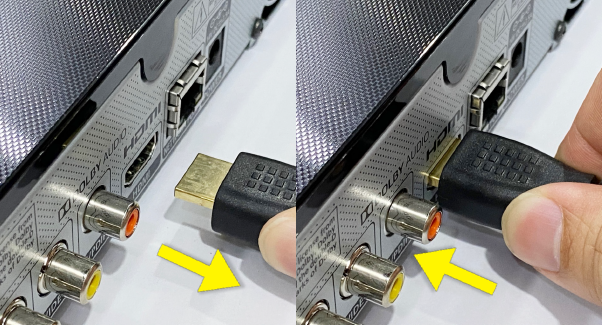
HDMI Users:
Ensure HDMI cable is firmly connected to both the Astro box and TV. Try a different HDMI port or cable if needed.
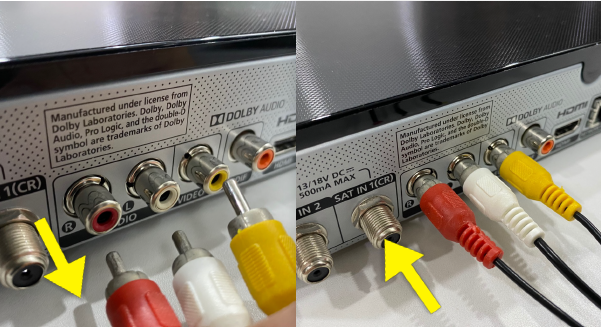
RCA Users:
Match red (audio right), white (audio left), and yellow (video) cables to the correct ports. Ensure cables are not loose or damaged.
STEP 3: Power Cycle the Astro Box
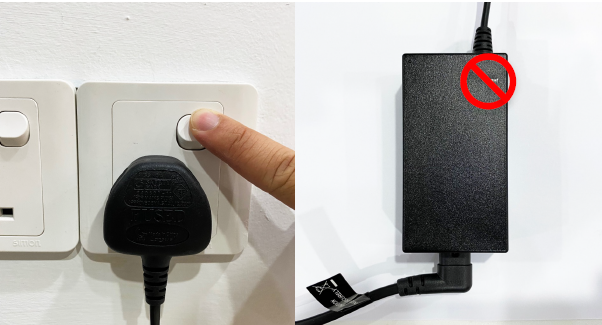
Turn off the Astro box.
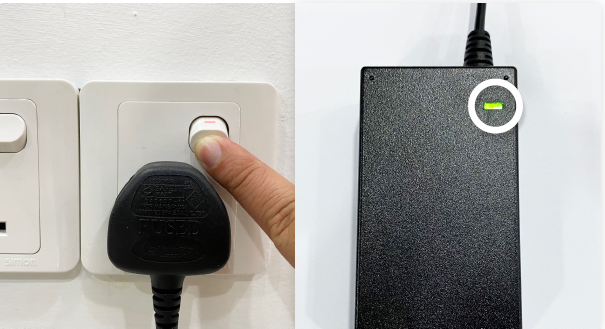
Unplug the power cable from the wall socket.
Wait 10 seconds, plug it back in, and turn it on.
STEP 4: Test with Alternative Port or Cable
Try a different HDMI or AV port on your TV. Use a different HDMI or RCA cable to rule out faults.
STEP 5: Contact Astro Support
If no improvement seen, please submit the issue in our Feedback Form and attach a picture of your smart card number for assistance or WhatsApp us at 03-95433838.
Similar Articles

