


 Track
Track
 Login
Login


PVR functionality not available - HD enabled Box
If you are facing this error message on your PVR box when trying to perform actions like record, pause live TV or view recordings, follow below steps.
Note: PVR functionality is only available for Astro customers and is not supported for NJOI customers.
Check your hard disk connectivity.
STEP 1
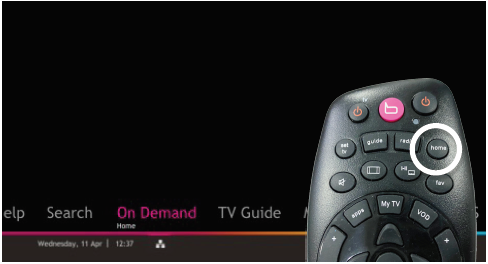
On your remote, press the “HOME” button and the home menu will be displayed at the bottom of your screen.
STEP 2
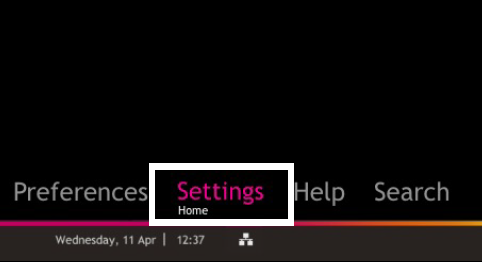
Navigate to SETTINGS and press “OK”.
STEP 3
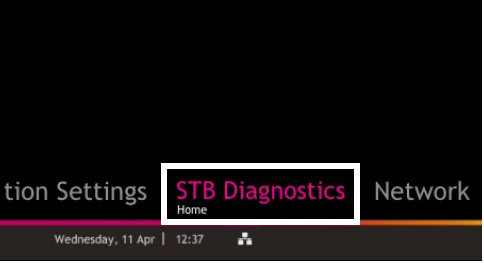
Navigate to STB DIAGNOSTICS and press “OK”.
STEP 4
From the General tab, take a look at the HDD Status.
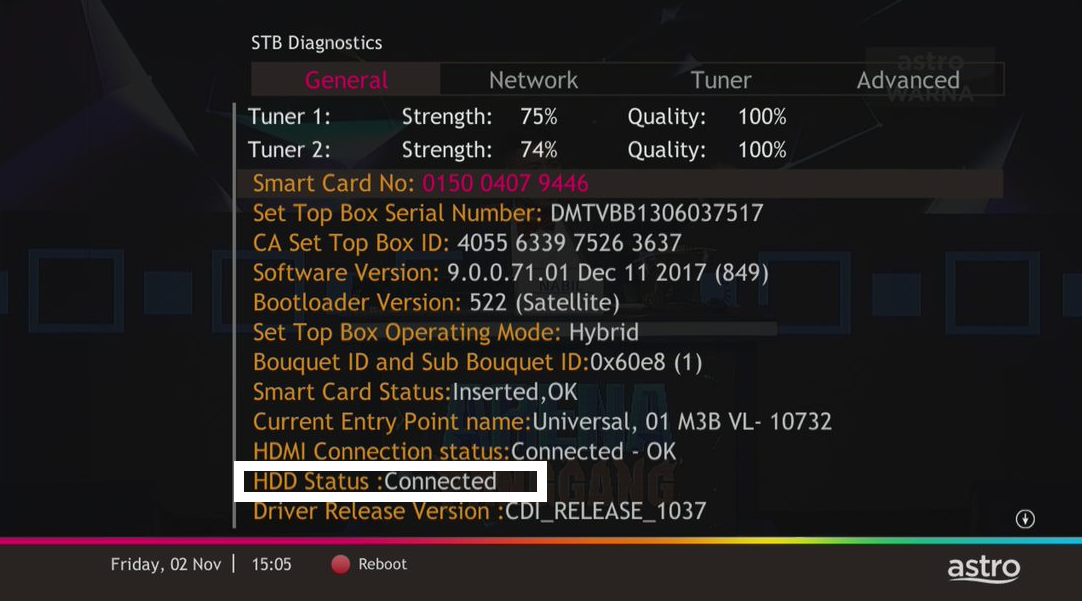
If status is "Connected", press red button to reboot you decoder.
Wait until the box is on, then try to record any program.
If issue persist, please submit the issue on our Feedback Form and attach a picture of your General tab of the STB Diagnostics for assistance.
If status is "Disconnected", it is likely that the hard disk inside your PVR box is faulty.
Please note that the PVR Box has been discontinued, and you will receive an Ulti or Ultra Box for your replacement.
Submit your Feedback Form and attach a picture of your General tab of the STB Diagnostics for assistance.
Similar Articles

